tech.info
Because this website is built for standard monitors
and laptops, if you view it on a small display, e.g. on
a tablet where the page does not fit (which results in
sliders appearing on the right side of the window or
at the bottom of the window*), a full-screen display
that turns on and off with the F11 key could help.
In order for the web browser to display their content
as quickly as possible, in most cases it helps itself with
data from the so-called the "Cache" memory, which
means that the content it displays may not be up to
date - it displays what it has in its memory, not the
actual content!
And since the content on these pages will be amended,
to show you the current one, it is recommended to re-
fresh the page when you view it. Just press F5, or Left
Ctrl+R, or click on the appropriate icon at the top of
the browser
If recovery is not enough - it did not help (which is
unlikely, but it can happen), it will be necessary to clear
the "cache" memory! and then refresh the page.


*)…by the way, do you know that…
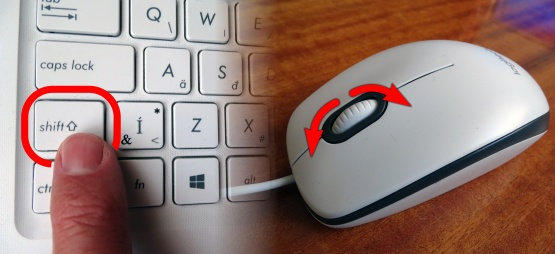
almost every current web browser supports
horizontal scrolling? Just as we scroll vertically (from
top to bottom and vice versa), so we scroll
horizontally (from left to right and vice versa) with the
mouse wheel, you just have to hold down the Shift
key while scrolling. »illustration«
The Chamois of the Tatras 2021, The international thematic contest of non-professional films © 20.3.2021, Peter Rybín (web design, production and administration), Grafik.Lmn.sk, abc.Lmn.sk
On a laptop touchpad, it's different - it's hard to say
whether it's simpler or more complicated - just
different…
»illustration«